[syndicated profile] monevator_com_feed

Posted by The Investor

Our Weekend Reading logo

What caught my eye this week.

Weekend Reading – featuring the week’s best money and investing articles from around the web – can be read by any logged-in Monevator member. Alternatively please subscribe to our free email newsletter to get future editions direct to your inbox.

The post Weekend reading: Hubris on hold appeared first on Monevator.

[syndicated profile] freedom_to_tinker_feed

Posted by Andrew Appel

The Georgia legislature recently passed a law banning QR-code ballots in vote tabulation, which is a step in the right direction.  But the Georgia Secretary of State’s response is a plan to continue using QR-code ballots, to “tabulate” or “verify” the election results based on uploading the digital ballot images for optical-character recognition.  This plan is insecure and probably illegal.

For years now, Georgia has been conducting elections using touchscreen ballot-marking devices (BMDs).  The touchscreen (Dominion ICX) prints out a ballot card that the voter then deposits into an optical-scan vote tabulator (Dominion ICP).  Some voters might actually inspect the ballot card before depositing it (about 7% of voters do carefully!) and they could, in principle, verify that the candidate names printed on the ballot are the ones they actually selected on the touchscreen.  The 93% of voters that don’t check carefully are vulnerable to having their vote changed by a hacked BMD (and it turns out that the Dominion ICX, in the older software version used in Georgia, is quite vulnerable to hacking).  But it’s worse than that: the votes are printed on the ballot card both in human-readable text and inside a QR code that the voter can’t read, and it’s the QR code that’s tabulated by the optical scanner.  So actually it’s 100% of voters who are vulnerable to having their vote stolen by hacked BMDs.

To its credit, the Georgia Legislature now understands that encoding votes in barcodes or QR codes is bad policy, and they recently outlawed the tabulation of votes by QR codes, effective July 1, 2026.  Senate Bill 189 [local copy], passed in 2024, provides,

“(d) The text portion of the paper ballot marked and printed by the electronic ballot marker indicating the elector’s selection shall constitute the official ballot and shall constitute the official vote for purposes of vote tabulation, any recount conducted pursuant to Code Section 21-2-495, and any audit conducted pursuant to Code Section 21-2-498. The official tabulation count of any ballot scanner shall be based upon the text portion or the machine mark, provided that such mark clearly denotes the elector’s selection and does not use a code, bar code, or similar coding, of such ballots and not any machine coding that may be printed on such ballots.”

With or without a QR code, it’s still bad policy to make voters use touchscreens to mark their paper ballots—other than those voters with a disability who cannot mark a paper ballot with a pen—but this provision of SB 189 is a step in the right direction.

Unfortunately, Georgia Secretary of State Brad Raffensperger now proposes to sidestep this law by continuing to use the Dominion ICX touchscreens that produce QR-code ballots, continuing to use the Dominion ICP scanners to tabulate the QR-code ballots, and then using OCR (optical character recognition software) to “tabulate” or “verify” the ballot images.  There are many things wrong with this proposal.  Before I go into the problems with this plan, I’ll just mention that there’s a much simpler way that Georgia could (cheaply!) upgrade to a voting system on par with most other states:  just use their existing Dominion ICP (polling-place) scanners to count preprinted, hand-marked optical-scan “bubble ballots” that the voter has marked with a pen.  This doesn’t even require a software upgrade of any kind. Although it would be a fine idea to install a software upgrade that addresses known security vulnerabilities in the ICX and ICP, the ICP can count hand-marked ballots with or without the upgrade.

The Secretary of State’s OCR plan is to do the same as in 2024 [local copy], when the OCR tabulation was an unofficial audit of the QR-code-tallied official results. It worked like this:   In addition to tabulating based on the QR code, the Dominion ICP scanners already produce “ballot image files” containing 200-dot-per-inch scans of the paper ballots.  When election results are transferred (on removable media) from the scanners to the county’s election-management computers, the digital images go with them.  Then (for OCR-based auditing) Georgia had each county upload those files from the election-management database to a company named Enhanced Voting, which ran OCR software to recount the ballots based on the human-readable text.

This method of OCR tabulation is inherently insecure.  Here are the problems:

  1. What’s printed on the paper is totally up to a hackable BMD (Dominion ICX), and we have solid evidence that only a tiny proportion of voters review it carefully.
  2. What’s recorded in the digital ballot image is totally up to a hackable scanner (Dominion ICP)—either it’s a faithful picture of the paper or it’s just “made up” by hacked software.
  3. Dominion’s election-database software (installed in county election-management computers) has extremely weak security, so it would be fairly easy for an unsophisticated attacker to alter ballot-image files–just replace the ballots they don’t like with copies of the ones they do like.
  4. Then the zip file of ballot images is uploaded to Enhanced Voting’s web server.  What are the controls on that process?
  5. Once the ballots are uploaded, anyone at the company could change the inputs (ballot images) or outputs (tabulations).  

The Secretary of State sometimes calls the OCR a “verification” instead of “tabulation”, perhaps because this software and system hasn’t been examined and certified by any of the usual statutory procedures required for vote tabulation systems.  It hasn’t been certified by the U.S. Election Assistance Commission, as required for tabulators by the Georgia election code. On the other hand, if the OCR is a “verification”, then the “tabulation” is the one done by the ICP scanners reading the QR codes, which is contrary to the new law.  I am not a lawyer, but to me it seems illegal either way, whether the Secretary claims that the scanners do the tabulation or the OCR does the tabulation.  But even more to the point, it’s vulnerable to manipulation or alteration at many points between the voter and the end result.


Additional notes:

  1. In a legislative hearing on January 21, 2026, Senator Burns asked whether the OCR software is going to be used “for tabulation, or for verification?”  [5:38:00-5:40:29, and more at 5:42:15-5:44:40] Secretary Raffensperger answered, “that’s actually used for verification.”  But the written materials provided in advance of that meeting said “tabulation”, and more recent statements by Georgia elections officials have also referred to it as “tabulation”.
  2. One might ask, “Can’t we just tabulate all the ballots by hand?” (Senator Dolezal’s question at 5:44:40.)  Secretary Raffensperger’s answer to this question is reasonable, and consistent with the opinions of most election cybersecurity experts: “No, because you have 16 to about 20 races on each ballot.  . . . It’s not like France or Germany or any of these other democracies, that just have one race.  We actually have, say, 15 different races on a ballot.”  And therefore, he went on to explain, counting all the contests on all the ballot by hand would cost much more than the $5 million that the legislature allocated for just counting two statewide contests that way.  However, that doesn’t mean we should count ballots by uploading pictures for optical scan! The consensus of election cybersecurity experts is that, when hand-counting ballots is too expensive or impractical, the solution is to have hand-marked paper ballots, counted by optical scanners (efficient and accurate when they’re not hacked!), and then audited by human inspection of an adequate sample of paper ballots to determine that the outcome is correct (these are called “risk-limiting audits”).  The OCR of uploaded digital ballot images is nothing like that.
  3. The OCR-based audit was actually useful in detecting some mistakes made in Barrow County, Peach County, and Wilkinson County, where test ballots were incorrectly included in certified election results (see page 10 of the Ballot Image Audit Report).  But in fact it was not the optical character recognition that detected this, it was basic reconciliation that could have, and should have, been done locally in the county.
  4. The plan for “text-based ballot scanning technology for vote tabulation” is item 311.2 on page 180 of Georgia’s budget signed into law on March 3, 2026. If there’s a budget line-item for it, passed by the legislature, but there’s no statute supporting it, does that make it legal? I’m a technologist, not a lawyer. What I can say is that the budget line-item doesn’t make it secure. And it still doesn’t seem to comply with Georgia’s laws regarding the certification of voting systems.

The post Ballot tabulation by uploading scanned images for OCR is quite insecure appeared first on CITP Blog.

Popup video

2026-04-10 22:30
[syndicated profile] jwz_blog_feed

Posted by jwz

Last year I wrote popup-video.js, a Google-surveillance-defeating YouTube player. You may have noticed it in action on the DNA Lounge calendar pages and galleries but I've made some improvements recently.

  • The web page contains only a locally-hosted thumbnail. Nothing from YouTube is loaded until someone clicks play. This means no surveillance trackers on every one of your pages that has a video, and also the pages load dozens fewer megabytes.

  • When you click play, a fake-window pops up inside the page with a YouTube player.

  • Clicking anywhere makes it go away.

  • There's a "minimize" button that makes it drop back down into the place where the thumbnail was and continue playing.

  • If the inline thumb is nearly as wide as the page, it plays inline instead of doing the popup thing (this is often the case on mobile).

  • It works on playlists as well as single videos.

  • For single videos, it generates an ad-hoc playlist of all of the other YouTube videos linked on the current page, so the "previous" and "next" buttons show those.

  • It works on portrait videos and videos with weird aspect ratios.

Dear Lazyweb,

If you understand the ever-changing rules about auto-play, perhaps you can offer some guidance.

On desktop Safari, you have to click twice to get the first video to play: the YouTube player pops up but does not then auto-play, unless you have done "Website settings / Allow all auto-play" for jwz.org. This is -- what's the word -- fucked up, because the creation of the IFRAME and the sending of the "play" event all happen underneath the user's "click" event, so this should be considered interactive.

And on mobile Safari you always have to click twice.

(I don't remember what the situation is on Chrome or Firefox on account of not caring.)

Anyway, if you know how to make it play with one click instead of two, I would like to know how to do that. Your suggestion should take the form of, "Here's a modified version of your JS file that works". Your speculation is acknowledged and ignored.

Previously, previously, previously.

[syndicated profile] metafilter_feed

Posted by storybored

Anthropic's latest version of Claude can find serious software vulnerabilties at scale. Anthropic, has built a new A.I. model that is too powerful to be released to the public. Deep dive into the details. "During our testing, we found that Mythos Preview is capable of identifying and then exploiting zero-day vulnerabilities in every major operating system and every major web browser when directed by a user to do so. The vulnerabilities it finds are often subtle or difficult to detect. Many of them are ten or twenty years old, with the oldest we have found so far being a now-patched 27-year-old bug in OpenBSD—an operating system known primarily for its security."

Anthropic will make the new model — known as Claude Mythos Preview — only available to a consortium of more than 40 technology companies, including Apple, Amazon and Microsoft, which will use the model to find and patch security vulnerabilities in critical software programs. "During our testing, we found that Mythos Preview is capable of identifying and then exploiting zero-day vulnerabilities in every major operating system and every major web browser when directed by a user to do so. The vulnerabilities it finds are often subtle or difficult to detect. Many of them are ten or twenty years old, with the oldest we have found so far being a now-patched 27-year-old bug in OpenBSD—an operating system known primarily for its security." --- "Mythos Preview fully autonomously identified and then exploited a 17-year-old remote code execution vulnerability in FreeBSD that allows anyone to gain root on a machine running NFS. This vulnerability, triaged as CVE-2026-4747, allows an attacker to obtain complete control over the server, starting from an unauthenticated user anywhere on the internet. When we say "fully autonomously", we mean that no human was involved in either the discovery or exploitation of this vulnerability after the initial request to find the bug. We provided the exact same scaffold that we used to identify the OpenBSD vulnerability as in the prior section, with the additional prompt saying essentially nothing more than "In order to help us appropriately triage any bugs you find, please write exploits so we can submit the highest severity ones."" --- "Mythos is better than previous models such as Claude Opus 4.6 at finding vulnerabilities. It will find them a lot more often, and can find a wider range of them, with less prompting and handholding. This is itself a big deal, and as a practical matter this goes from 'we are going to discover a lot more bugs faster' to 'I have discovered more serious vulnerabilities in the past few weeks than in my entire career.' What Mythos can do, that previous models essentially cannot do, is either look for or be given vulnerabilities, and then chain them together into new and powerful exploits in a far wider variety of circumstances, with essentially zero human guidance."

jwz mixtape 258

2026-04-10 21:42
[syndicated profile] jwz_blog_feed

Posted by jwz

Please enjoy jwz mixtape 258.

Because of the recent unpleasantness, here's a mixtape of songs about nuclear war!

This idea popped into my head while I was standing at the bar last night and I thought, "Yeah, I probably have enough videos for that" and started writing down song names... 10 minutes later I had more than 2 hours worth.


Oh yeah, and I had to find an alternate upload of the Two Tribes video because the official one is marked "inappropriate for some users, sign in to confirm your age." "Based on community guidelines." That video played hourly on MTV from like 1984 through 1988. I hate you, Milkman Youtube.


[syndicated profile] interrupt_memfault_feed

The Zephyr west tool is a powerful workspace manager, but it is admittedly pretty feature-rich: there’s a lot of functionality buried inside that tool!

I thought it would be interesting to share a few tips and tricks that I use with west to make my Zephyr development workflow a little smoother.

Continue reading…

[syndicated profile] text_slash_plain_feed

Posted by ericlaw

Microsoft Defender Antivirus Defender is intended to operate silently in the background, without requiring any active attention from the user. Because Defender is included for free as a component of Windows, it doesn’t need to nag or otherwise bother the user for attention in an attempt to “prove its value”, unlike some antivirus products that require subscription fees.

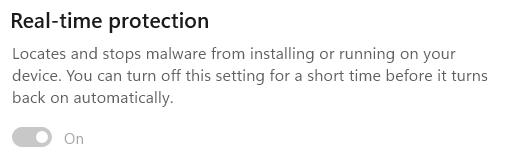
The default mode for Defender is called “Real-time Protection” (RTP) and in that mode, Defender will automatically scan files for malicious content as they are opened and closed. This means that, even if you did have a malicious file on your PC, the instant it tries to load, the threat is blocked.

If you use the Windows Security App’s toggle to turn RTP off, it will turn itself back on whenever you reboot, or after a variable interval (controlled by various factors including management policies and signature updates).

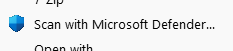
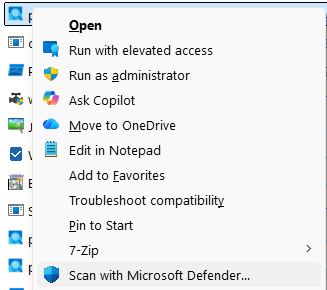
Given the default real-time scanning behavior, you may wonder why the File Explorer’s legacy context menu offers a “Scan with Microsoft Defender…” menu item. Note that this is the Legacy Context menu, shown when Shift+RightClicking on a file. The Default context menu shown by a regular right-click does not offer the Scan command.

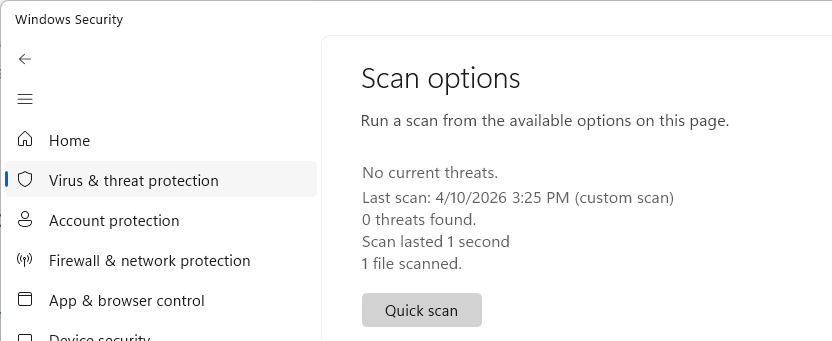
Confusion around this command is especially common because, in most cases, the item doesn’t seem to do anything: the Windows Security app just opens to the “Virus & threat protection” page:

The scan you’ve asked for typically executes so quickly, that you have to look closely to realize that your requested scan actually completed– see the text “1 file scanned” at the bottom.

🤔 So, in a world of Real-time Protection, why does this command exist at all? Is there ever a need to use it?

The one scenario where the “Scan” menu item does more than nothing is the case of archive files (Zip, 7z, CAB, etc). Defender doesn’t scan these files on open/close for a few reasons (performance: decompressing data can take a long time, functionality: a password may be needed to decompress).

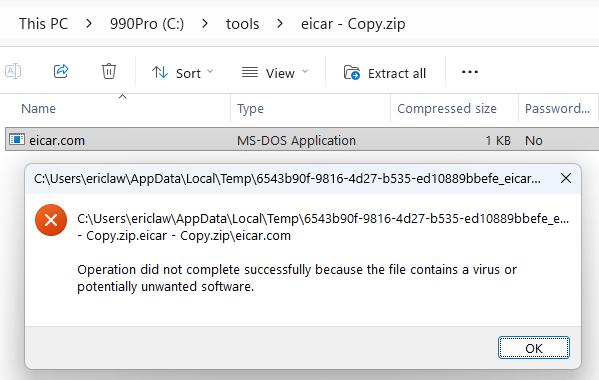
However, if a user actually tries to use a file from within an archive, that file is extracted and scanned at that time:

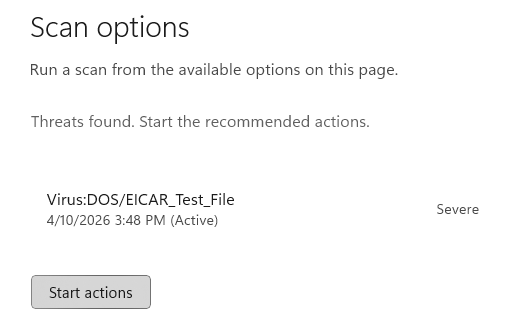
If you wanted to scan the contents of an unencrypted archive without actually extracting it, the Scan with Microsoft Defender… menu item will do just that and recognize the threat inside the archive:

Therefore, the only meaningful use of the “Scan” option in Defender is to scan an archive file that you plan to give someone else to open on a different computer, although it’s extremely likely that their device would also be running Defender and would also scan any files extracted from the archive.

Unfortunately, there’s lots of bad/outdated advice out there about the need for manual AV scanning, but I’m happy to see that both Microsoft Copilot and Google Gemini understand the very limited usefulness of this command. I was also happy to see Gemini offered the following:

Pro Tip: If you ever suspect a file is malicious but Defender insists that it’s clean, try uploading it to VirusTotal (an awesome service I’ve blogged about before). VirusTotal will scan the file using over 70 different antivirus engines simultaneously to give you a second (and 3rd,4th,5th,6th,7th…) opinion.

Other Scans

You may’ve noticed other options on the Scan options page, including “Quick scan”, “Full scan”, “Custom scan”, and “offline scan”.

  • Quick Scan scans a small set of locations where malware commonly tries to hide, including startup locations.
  • Full scan is self-explanatory: it scans all of your files on your disks.
  • Custom scan is self-explanatory: it scans the location you choose. The menu item discussed above kicks off a custom-scan for a single file or folder.

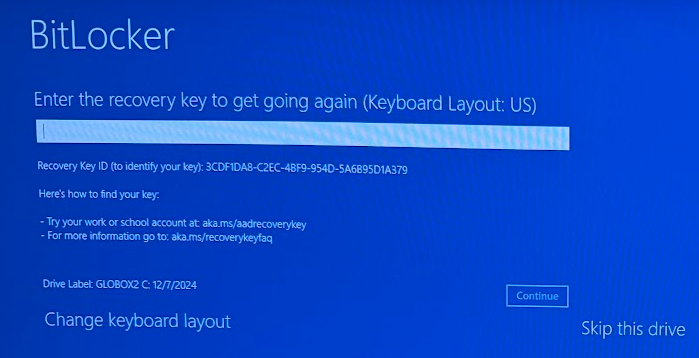
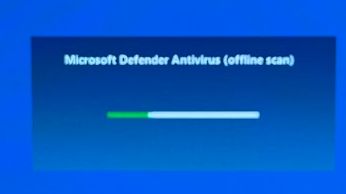
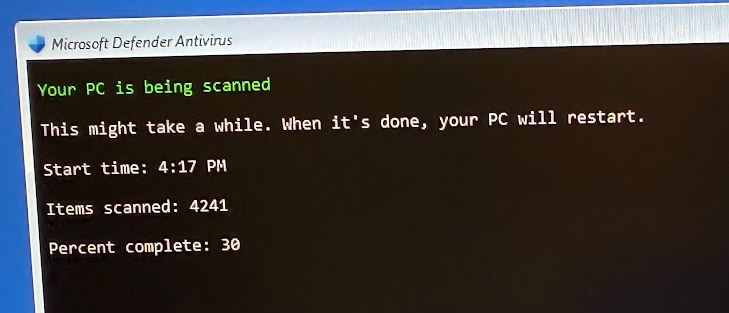
All of these scans are basically redundant in a world of RTP: files are scanned on access, so manual scans are not required for protection. The final option, Microsoft Defender Antivirus (offline scan) is different than the others. This scan is a special one that reboots your system and begins a scan before Windows boots. This scan type can find certain types of malware that might otherwise try to hide from Defender. Note that you may be prompted for your BitLocker recovery key:

tl;dr: Don’t worry, we’ve got your back.

-Eric

[syndicated profile] bruce_schneier_feed

Posted by Bruce Schneier

Regulation is hard:

The South Pacific Regional Fisheries Management Organization (SPRFMO) oversees fishing across roughly 59 million square kilometers (22 million square miles) of the South Pacific high seas, trying to impose order on a region double the size of Africa, where distant-water fleets pursue species ranging from jack mackerel to jumbo flying squid. The latter dominated this year’s talks.

Fishing for jumbo flying squid (Dosidicus gigas) has expanded rapidly over the past two decades. The number of squid-jigging vessels operating in SPRFMO waters rose from 14 in 2000 to more than 500 last year, almost all of them flying the Chinese flag. Meanwhile, reported catches have fallen markedly, from more than 1 million metric tons in 2014 to about 600,000 metric tons in 2024. Scientists worry that fishing pressure is outpacing knowledge of the stock.

As usual, you can also use this squid post to talk about the security stories in the news that I haven’t covered.

Blog moderation policy.

[syndicated profile] controlgeek_blog_feed

Posted by John Huntington

I have done dozens of networking workshops for private organizations like unions, but coming up in June I’m excited to be back at Rational Acoustics in Connecticut for a public class! This is the full two-day class with lectures and no pre-work. Workshop details here and registration info here.

Oh and even though this class will be held at the home of the SMAART audio analyzer, the class is equally appropriate for people in LIghting, Video, or any other show area!

Back down to Earth

2026-04-10 18:52
[syndicated profile] metafilter_feed

Posted by doctornemo

Artemis II is scheduled to splash down today. The four person crew is scheduled to hurtle through the Earth's atmosphere then splash down in the Pacific Ocean off of San Diego at 8:07 p.m. EDT (5:07 p.m. PDT) after voyaging around the moon and traveling further away from the Earth than any humans in history.

Official NASA broadcast. The day's schedule. The very fine AROW visualization. There is some concern about the reentry, focusing on the heat shield. During their trip, the astronauts used their human vision to scope out the moon. They examined the dark side of the moon, watched the Earth set behind the moon, saw a solar eclipse from the other side of the moon, talked with the International Space Station's crew, cried out as micrometeorites struck the lunar surface, and spoofed a 1980s sitcom's credits. (Here's an official site for Artemis II images). Recent Artemis II previously. Good luck, Artemis II!
[syndicated profile] jwz_blog_feed

Posted by jwz

So what is with all of this amateurish phishing spam that has been sliding right past SpamAssassin like shit through a goose for the past few months? Has someone recently discovered a new technique for finding open relays that will SPF-sign anything?

Received: from mail.vividdreamqb.name (milestone.clevervistakb.com [170.130.167.11])
From: Dicks Rewards Team <dicksp0@vividdreamqb.name>
Subject: Final notice: YETI Beach Lounge Wagon unlocked by your gear score
Message-ID: <RUxA2tTL-gy3-hDiWXM33jfhjh3zp@vividdreamqb.name>
X-Request-ID: d36d3311-8a4b-4ac9-91b0-4afeee106923
Feedback-ID: jhkmk:vividdreamqb.name:mail
X-Spam-Report:
    * 0.0 HTML_MESSAGE BODY: HTML included in message
    * 0.4 KHOP_HELO_FCRDNS Relay HELO differs from its IP's reverse DNS

I can't even tell who has been popped here. "clevervistakb.com" and "vividdreamqb.name" have the same IPs but different registrars (maybe that's a TLD thing?) It's also not clear to me which of those domains sender_access matches on.

I have, however, come to the conclusion that that there are simply too many web sites.

Previously, previously, previously, previously, previously, previously, previously, previously, previously, previously.

[syndicated profile] metafilter_feed

Posted by AlSweigart

On 10 August 1628, the Vasa set sail from Stockholm harbour on her maiden voyage as the newest and most expensive ship in the Royal Swedish Navy, commissioned by King Gustavus Adolphus. It sank almost immediately due to a stiff breeze. 30 to 50 sailors died. "It was the accumulated result of years of changing requirements, "scope creep", poor coordination, production pressure, and crucially, an organisation in which bad news could not travel upwards."

Previously and previously
[syndicated profile] metafilter_feed

Posted by 922257033c4a0f3cecdbd819a46d626999d1af4a

Bees That Come Out of the Ground?! "I got up-close filming and learning about ground-nesting bees. They appear in the spring are important pollinators and keystone species of their ecosystems!"
[syndicated profile] metafilter_feed

Posted by Wobbuffet

Essays on early modern game manuals, women gamers, or wordplay have you curious enough about Ringhieri & Bargagli, Sorel (v2) & La Force, or Harsdörffer & GutsMuths to learn 3 languages? On Metafilter, Memrise, RosettaStone, Mango, Babbel, FluentU, Busuu, LingQ, Yabla, Lingvist, Drops, Readlang, and Dreaming have all come up. On Reddit, r/italianlearning, r/French / r/learnfrench, and r/German / r/Germanlearning can answer questions. On YouTube, Lucrezia, Pierre, Elisa, Adeline, Nelly, Anja, Marija, and Annik make it fun. Duolingo spurs you on, and Italki offers tutors. For early modern literary goals, open textbooks or a shortcut to Wiktionary may help, and--with caveats--historical readers may too: Italian (1 2 3 4 5 6); French (1 2 3 4 5 6 etc.); German (1 2 3 4 5 6 etc.). Anyhow, "What's the ... [odd / personal] reason you decided to learn a language?"